
If you use HubSpot data enrichment, you may receive requests to remove enriched data from a contact record. This article explains what those requests are, where to manage them, and how to process them correctly.
Important: HubSpot provides the tools to manage these requests, but your legal team should advise you on the right compliance approach for your business.
What is an enriched data deletion request?
HubSpot maintains a commercial dataset of professional information that can be used to enrich contact and company records. If an individual opts out of that dataset, HubSpot deletes their enrichment data and stops using it for enrichment purposes. HubSpot can also notify customers who previously received that data.
In your HubSpot account, this appears as an Enriched data deletion request.
When do these requests happen?
A request can be created when a contact opts out of HubSpot’s enrichment dataset. According to the results of the documentation searches I made, this can happen when:
- A contact submits HubSpot’s Privacy Preferences form and asks to delete their data from HubSpot’s commercial dataset.
- A contact in the EU receives a notice that they are part of the commercial dataset and follows the opt-out steps in that message.
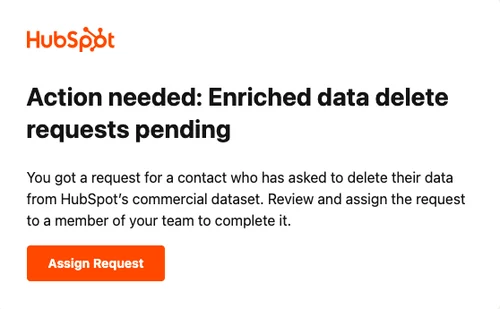
When an enriched data delete request is created, HubSpot sends an email notification with the subject line Action needed: Enriched data delete requests pending.
Your two options for handling enriched data deletion requests
You can manage these requests in one of two ways:
1. Manual handling
Choose this option if you want a Super Admin to review and action each request individually.
Use manual handling when:
- You want internal review before deletion
- You need to coordinate with compliance or legal stakeholders
- You want to control the timing of each action
2. Automatic handling
Choose this option if you want HubSpot to automatically delete enriched data whenever a request is received.
With this setting turned on:
- The enriched data is automatically deleted from your account
- The request is automatically actioned
- You receive an email when the request is processed
How to review and manage requests manually
- Open Privacy & Consent in Settings.
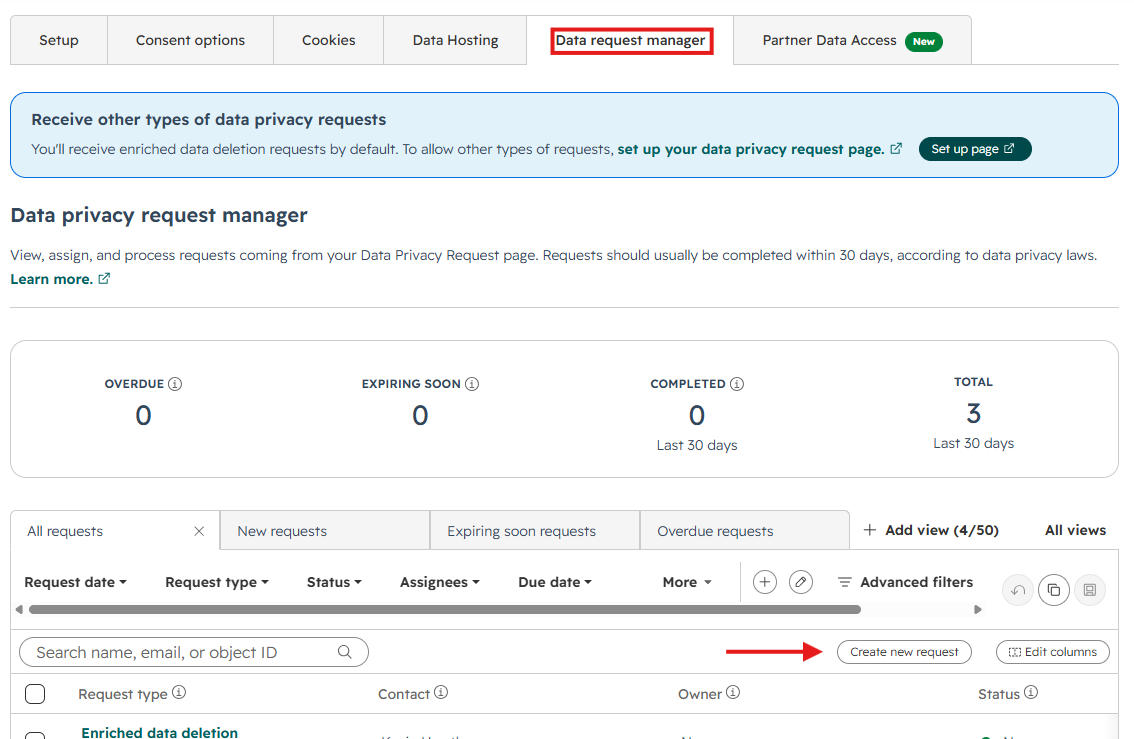
- Click the Data Request Manager tab.
- Find the relevant request.
- Click the request to open the details panel.
- Follow the instructions in the right-hand panel to complete the action.
- Click Mark as completed.
You can also:
- Filter requests using the dropdown menus at the top of the manager
- Open the contact record by clicking the contact’s name
- Bulk action requests when the selected requests are the same type
- Bulk mark requests as completed
How to create an enriched data deletion request manually
If someone makes a request outside your public request page, such as by phone or email, you can log it manually.
To create a request manually:
- Go to Privacy & Consent in Settings.
- Open the Data Request Manager tab.
- Click Create new request.
- Select the contact.
- Set Request type to Enriched data deletion.
- Add the request date.
- Assign an owner.
- Click Create new request.
How to assign ownership
Data privacy requests can only be assigned to Super Admins.
If you need to assign or reassign a request:
- Hover over the owner column for the request
- Click Assign or Reassign
- Choose the appropriate HubSpot user
- Save the change
How to turn on automatic deletion for enriched data requests
If you want HubSpot to process these requests automatically:
- Go to Privacy & Consent in Settings.
- In the setup tab,, scroll to Additional settings.
- Turn on Delete enriched data when request is received.
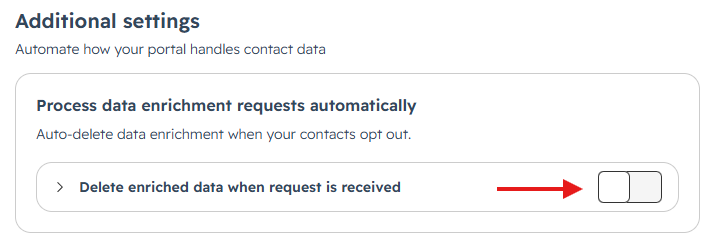
Once enabled, HubSpot automatically actions future enriched data deletion requests and sends you an email when each request is processed.
How to turn automatic deletion off
If you want to go back to manual review:
- Return to Privacy & Consent in Settings
- In the setup tab, scroll to Additional settings.
- Turn off Delete enriched data when request is received
- Confirm by clicking Turn off ruleset
How to set up a request page for contacts
You can also publish a data privacy request page so contacts can submit requests directly.
To set it up:
- Go to Privacy & Consent in Settings.
- Under GDPR & regional settings.
- In the Data privacy request page section, click Configure.

- Choose which request options to offer, such as:
- Delete contact data
- Export contact data
- Country field
- ReCAPTCHA
- Enter a business email address for verification messages.
- Publish the page.
Note: According to the results of the documentation searches I made, requests from contacts with enriched data are received by default, and this setting cannot be changed.
Best practices for managing these requests
To keep the process controlled and compliant:
- Decide on one operating model: manual review or automatic deletion
- Limit ownership to the right people since requests can only be assigned to Super Admins
- Document your internal process for review, action, and confirmation. This should include who is responsible for the request/s
- Monitor email alerts so requests are not missed
- Coordinate with legal or compliance teams when you need guidance on regional privacy obligations
Related control: turning off enrichment in your account
If you no longer want your account to use enrichment data, turning off enrichment settings is separate from handling deletion requests.
Super Admins can turn off enrichment features in Data Enrichment, including automatic and continuous enrichment. You can also remove user access to enrichment in Users & Teams if you want tighter control over future enrichment activity (Data management access).
Troubleshooting notes
If you are not seeing these options:
- Confirm that you have access to Privacy & Consent
- Confirm that a Super Admin is available to own the request
- Check whether automatic deletion is already enabled before trying to process requests manually
Final takeaway
HubSpot gives you a clear process for managing enrichment-related deletion requests:
- Review them in the Data Request Manager
- Assign them to a Super Admin when necessary
- Decide whether your team should process them manually or automatically
The most important step is to align the HubSpot setup with your internal privacy process so requests are handled consistently and on time.